> For the complete documentation index, see [llms.txt](https://docs.macgai7.com/macgai-manual/llms.txt). Markdown versions of documentation pages are available by appending `.md` to page URLs; this page is available as [Markdown](https://docs.macgai7.com/macgai-manual/payments/unpaid/message-1.md).
# 결제 알림톡 발송
검색 된 미납 내역을 이용해 문자 또는 결제 알림톡을 보낼 수 있어요.
{% hint style="danger" %}
맥가이 사용 가이드 문서가 채널톡으로 이전되었습니다.\
기존 문서는 더 이상 업데이트되지 않으니, 앞으로 최신 가이드는 채널톡에서 확인해 주세요.\
[채널톡 바로가기↗](https://docs.channel.io/macgai-guide/ko/articles/unpaid-sms-payment-ec7900f4)
{% endhint %}
↖ 상위항목: [미납 관리](/macgai-manual/payments/unpaid.md)
## 문자 결제 알림톡 보내기
{% hint style="info" %}
을 사용하려면 **결제선생** 서비스에 가입이 되어 있어야 합니다.
결제 선생 가입 및 사용에 대한 내용은 [문자결제(결제선생) 사용하기↗](/macgai-manual/payments/sms.md) 를 참고하세요
{% endhint %}
미납 내역을 검색하고 학생이 선택된 상태에서 버튼을 클릭하면 발송 유형을 선택할 수 있어요. 원하는 유형을 선택해 결제 알림톡을 보낼 수 있습니다.
* **화면에 보이는 미납 내역만 발송:** 조건을 부여해 일부 미납 항목만 검색 된 경우 화면에 보이는 미납 내역만 포함하여 결제 문자를 발송합니다.
* **검색 된 학생의 모든 미납 내역을 발송**: 검색 조건과 관계 없이 선택한 학생의 모든 미납 내역을 일괄 발송합니다.
{% hint style="warning" %}
두 유형 모두 선택한 학생을 대상으로 합니다. 검색 되지 않은 학생은 결제 문자가 발송되지 않아요.
{% endhint %}
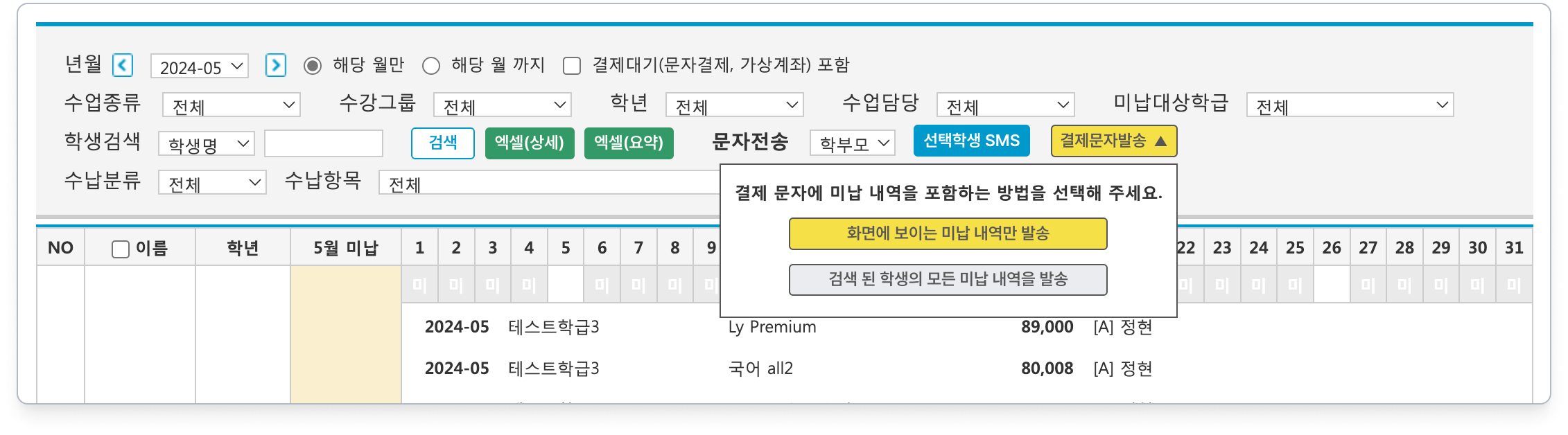
 버튼을 클릭하면 발송 유형을 선택할 수 있어요. 원하는 유형을 선택해 결제 알림톡을 보낼 수 있습니다.