> For the complete documentation index, see [llms.txt](https://docs.macgai7.com/macgai-manual/llms.txt). Markdown versions of documentation pages are available by appending `.md` to page URLs; this page is available as [Markdown](https://docs.macgai7.com/macgai-manual/payments/sms/payssam/cancel.md).
# 청구서 파기와 결제 취소
청구서를 파기하고 완료 된 결제를 취소하는 방법을 살펴봅니다.
{% hint style="danger" %}
맥가이 사용 가이드 문서가 채널톡으로 이전되었습니다.\
기존 문서는 더 이상 업데이트되지 않으니, 앞으로 최신 가이드는 채널톡에서 확인해 주세요.\
[채널톡 바로가기↗](https://docs.channel.io/macgai-guide/ko/articles/cancel-payssam-bill-0b2c42ad)
{% endhint %}
## 청구서 수동 파기하기
결제 대기 (결제 선생 알림톡 발송 후 결제 완료되지 않은 상태) 건의 청구서를 파기 처리 할 수 있습니다.
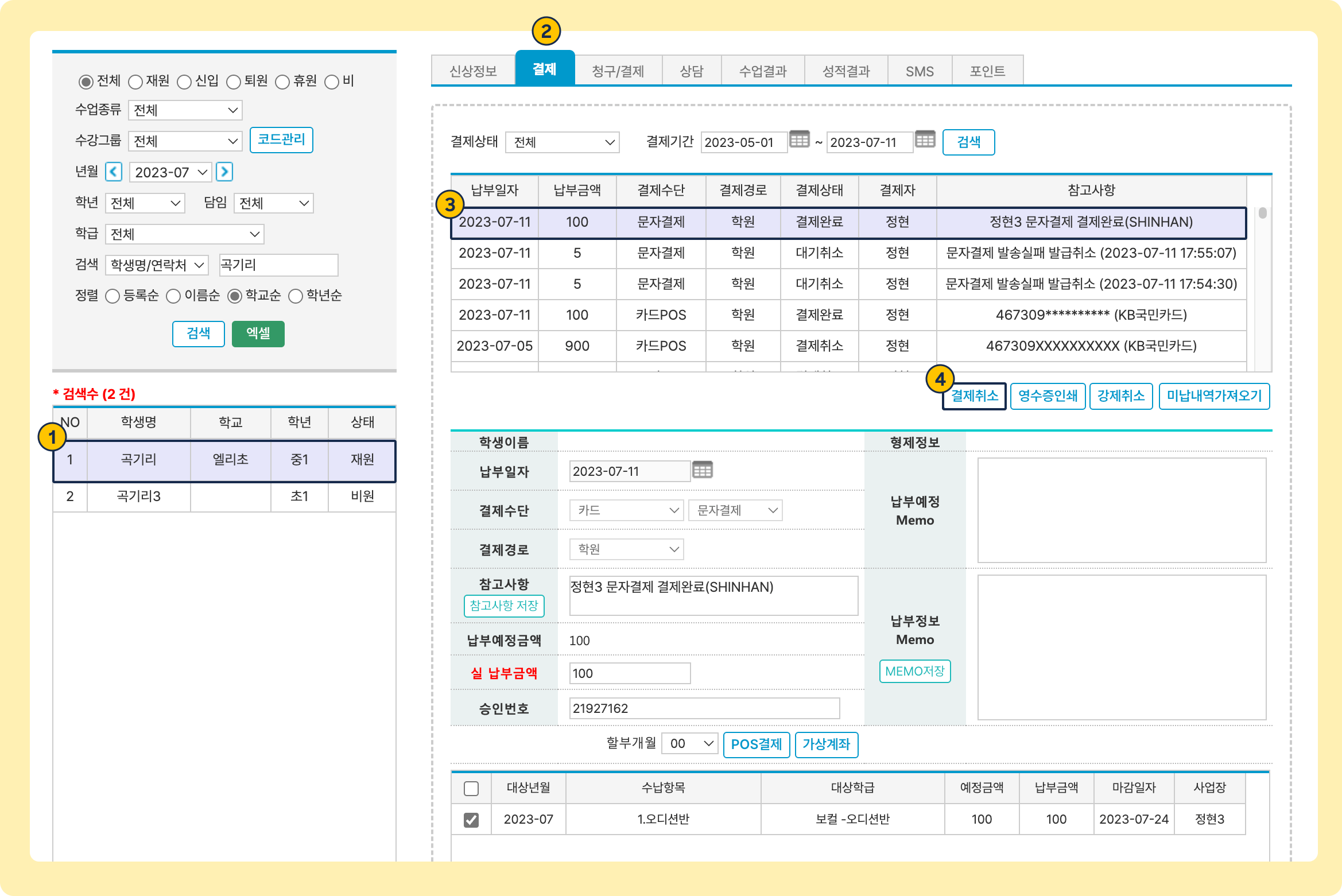
1. 우측 상단 검색바 또는 학생관리 메뉴에서 학생을 검색 및 선택
2. **결제 탭**으로 이동합니다.
3. **결제수단: ****문자결제**** / 결제상태: ****결제대기**인 문자 결제 발송 건을 선택
4. \[결제취소]를 누르면 하면 청구서가 파기됩니다.
* 파기 처리가 되면 해당 청구서로 결제를 진행할 수 없습니다.
{% hint style="warning" %}
**강제취소** 사용 시, 매니저 사이트로 이동해 해당 발송 내역을 검색하고 별도의 취소 과정을 진행해야 합니다.
[매니저 사이트에서 청구서 파기하기↗](/macgai-manual/payments/sms/payssam/manager.md#undefined-3)
{% endhint %}
## 결제 대기 일괄 취소하기
결제 대기 (결제 선생 알림톡 발송 후 결제 완료되지 않은 상태) 건의 청구서를 일괄 취소 처리 할 수 있습니다.
1. \[학생관리] -> \[미납현황] -> 결제대기(문자결제) 일괄취소
2. 필터링 및 결제 대기 취소 항목 선택
**필터링**: 특정 결제 대기 내역을 보고 싶다면 상단 영역에서 필터링이 가능합니다.
**취소**: 결제 대기 내역을 일괄, 복수, 단일 지정 후 취소가 가능합니다.
3. 결제 대기 취소 성공과 실패 결과
**취소 성공**: 결제 대기 취소에 성공해 미납 현황에 다시 노출
**취소 실패**: 통신 장애 등의 오류로 결제 대기 취소에 실패한 내역
**결제 완료 건**: 이미 결제 완료된 내역
## 결제 완료 건 취소하기
청구서 파기와 진행 과정은 동일하며, 결제대기가 아닌 '**결제완료**' 건을 선택하는 부분만 달라요.
* **결제수단: ****문자결제**** / 결제상태: ****결제완료**인 결제 건을 선택 후 \[**결제취소**] 를 누르면 결제가 취소 및 환불 처리가 진행됩니다.

 [매니저 사이트에서 청구서 파기하기↗](/macgai-manual/payments/sms/payssam/manager.md#undefined-3)
{% endhint %}
## 결제 대기 일괄 취소하기
결제 대기 (결제 선생 알림톡 발송 후 결제 완료되지 않은 상태) 건의 청구서를 일괄 취소 처리 할 수 있습니다.
1. \[학생관리] -> \[미납현황] -> 결제대기(문자결제) 일괄취소
[매니저 사이트에서 청구서 파기하기↗](/macgai-manual/payments/sms/payssam/manager.md#undefined-3)
{% endhint %}
## 결제 대기 일괄 취소하기
결제 대기 (결제 선생 알림톡 발송 후 결제 완료되지 않은 상태) 건의 청구서를 일괄 취소 처리 할 수 있습니다.
1. \[학생관리] -> \[미납현황] -> 결제대기(문자결제) 일괄취소